Установщик (автоматическая установка CMS)
Установщик позволяет автоматически установить выбранную вами CMS на хостинг.
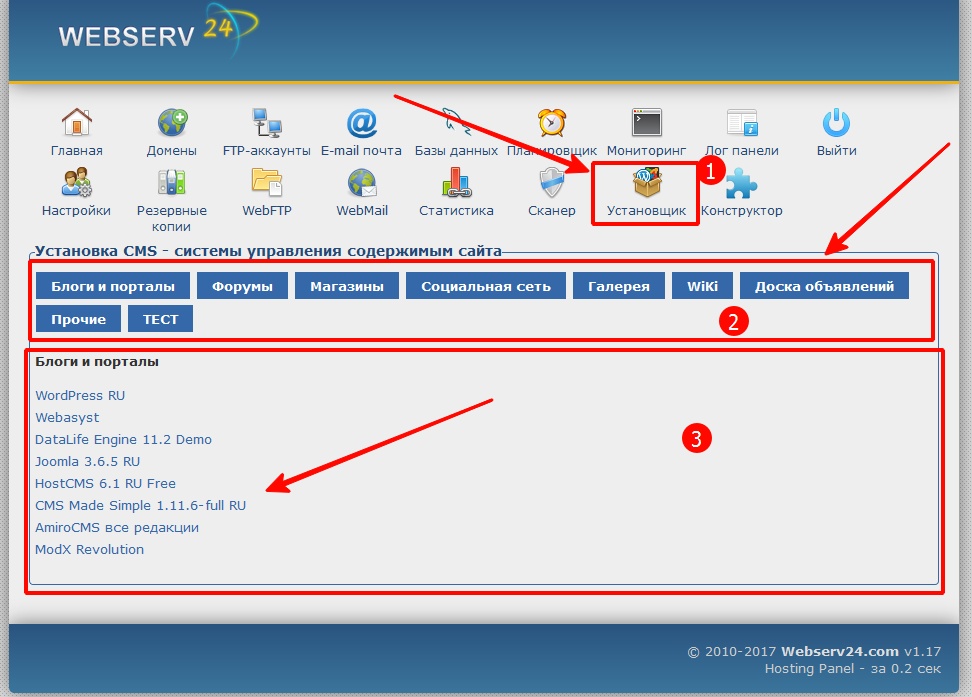
Хостинг-панель → Установщик. (Цифра 1 на картинке.)
1. Выбираете какой тип CMS вы хотите установить. (Цифра 2 на картинке.)
2. После выбора категории, у вас появится список доступных CMS (Цифра 3 на картинке.)
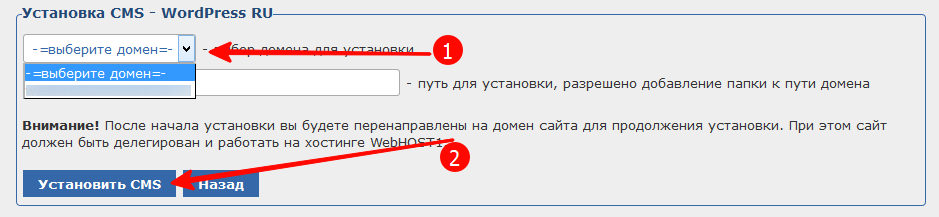
После выбора интересующей вас CMS вам система предложит выбрать для какого домена необходимо установить сайт. (Цифра 1 на картинке.) Нужные пути и папки система создаст автоматически.
После вводе всех данных нажимаете на кнопку Установить CMS. (Цифра 2 на картинке.) По завершении установки вам будут выведен результат установки со всеми данными администратора и настройки CMS.
Важно
Некоторые CMS необходимо продолжать установку перейдя на домен сайта. О такой необходимости система уведомит.