Добавление домена и поддомена на хостинг с Webserv24.
!(Все обозначения как domain.ru необходимо заменить на ваш домен.)
Делегирование домена на хостинг осуществляется в два этапа:
Добавление домена в панель хостинга.
Войдите в панель хостинга, откройте раздел Домены и заполните всего два поля:
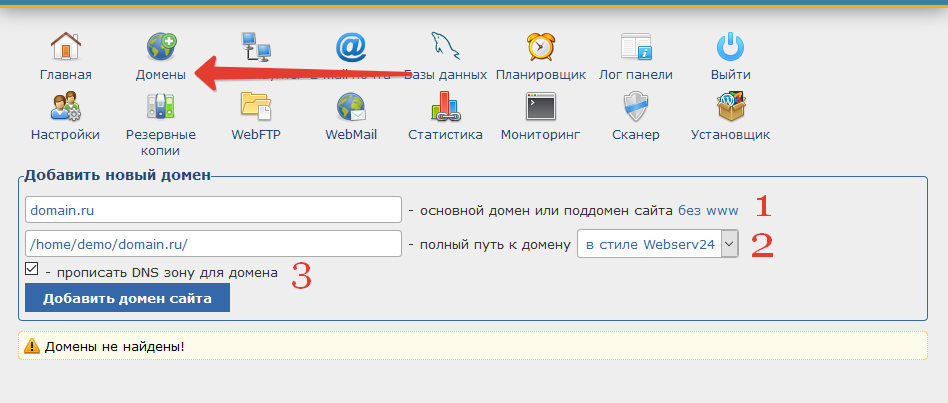
Пункты указанные на скрине:
1. Укажите свой домен, без http:// и www
2. Путь домена прописывается автоматически, но можно указать нужный вам.
3. Использовать DNS настройки хостинга или нет. Если используете наши NS, то галочку надо оставить.
Прописывание NS в настройках домена
После того, как вы добавили домен в панель хостинга, необходимо направить его на наш DNS сервер. Для этого в настройках домена (там, где регистрировали домен) прописываете наши NS адреса:
ns1.webserv24.com.
ns2.webserv24.com.
Внимание!
Обновление DNS в среднем занимает 24 часа, в редких случаях — до 72 часов.
По этой причине, сразу после добавления домена или поддомена, он может заработать не сразу, а через некоторое время.
По этой причине, сразу после добавления домена или поддомена, он может заработать не сразу, а через некоторое время.