Настройки хостинг-аккаунта
В этом разделе вы можете производить настройки хостинг-аккаунта, включать или выключать функции и т.д.
Настройки пользователя
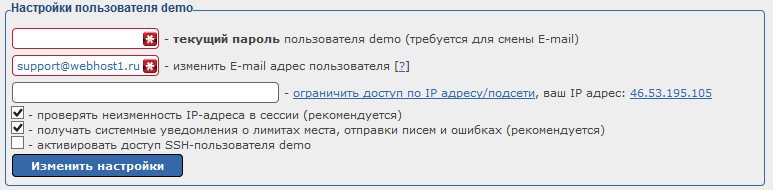
· Текущий пароль
Необходимо указывать пароль от хостинг-панели в том случае, если вы хотите изменить е-майл адрес в настройках.
· Изменить E-mail
Изменение е-майл адреса от хостинг-аккаунта. На этот е-майл приходят уведомления об ошибках, а также письмо восстановлении пароля от хостинг-панели.
· Ограничение по IP
Ограничивает доступ к хостинг панели по IP-адресу. В поле необходимо указать IP, который может зайти в панель, все другие зайти не смогут.
· Проверка IP в сессии
Возможность привязать IP-адрес к сессии. Желательно не отключать эту опцию, это дополнительная безопасность, но вы можете ее отключить, если у вас каждую минуту меняется IP-адрес.
· Получать системные уведомления
Здесь можно отключить уведомления о занятости места (если на хосте больше нет места), уведомления о пределе исходящих писем и т.д. Желательно эти опции не отключать.
· Активировать SSH
Активация шелл (SSH) доступа к хостинг-аккаунту. Достпуно только для тарифов с SSH.
Смена пароля
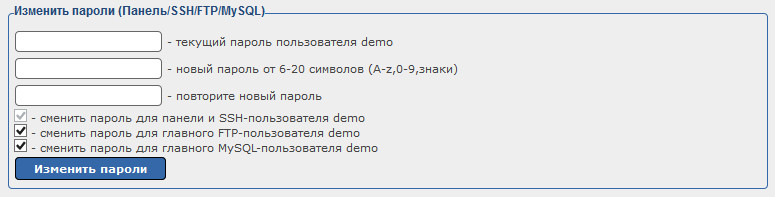
· Текущий пароль
Для смены пароля обязательно необходимо указать текущий пароль от хостинг-панели.
· Новый пароль и повтор
Два поля для указания нового пароля и его подтверждения. Оба поля должны быть заполнены одинаково.
· Изменить для панели и SSH
Смена пароля от хостинг-панели и SSH-доступа. Активировано по умолчанию, отключить нельзя.
· Изменить для главного FTP
Здесь вы можете выбрать, менять ли пароль только от хостинг-панели, или и от главного FTP пользователя.
· Изменить для главного MySQL
Здесь вы можете выбрать, менять ли пароль только от хостинг-панели, или и от главного MySQL пользователя.
Список DNS-серверов
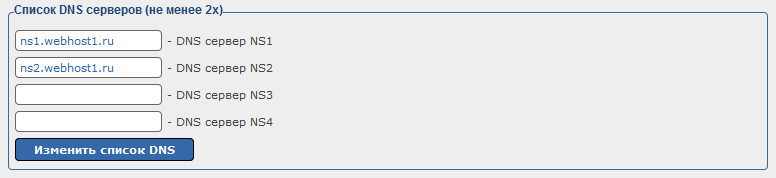
Этот пункт необходим для тех, кто хочет настроить свои DNS-сервера. Если вы не используете свои DNS, то в этом пункте ничего менять не нужно.